Saturday, November 5, 2011

Download Windows 8 Developer Preview English, 32-bit (x86)


Windows 8 Developer Preview downloads

The Windows 8 Developer Preview is a pre-beta version of Windows 8 for developers. These downloads include prerelease software that may change without notice. The software is provided as is, and you bear the risk of using it. It may not be stable, operate correctly or work the way the final version of the software will. It should not be used in a production environment. The features and functionality in the prerelease software may not appear in the final version. Some product features and functionality may require advanced or additional hardware, or installation of other software.
Note: You can't uninstall the Windows 8 Developer Preview. To go back to your previous operating system, you must reinstall it from restore or installation media.


Windows 8 Developer Preview English, 32-bit (x86)


Includes a disk image file (.iso) to install the Windows 8 Developer Preview and Metro style apps on a 32-bit PC.
Note: This download does not include developer tools. You must download the Windows 8 Developer Preview with developer tools 64-bit (x64) to build Metro style apps.

Screenshots :


System Requirements

The Windows 8 Developer Preview works great on the same hardware that powers Windows Vista and Windows 7:
  • 1 gigahertz (GHz) or faster 32-bit (x86) or 64-bit (x64) processor
  • 1 gigabyte (GB) RAM (32-bit) or 2 GB RAM (64-bit)
  • 16 GB available hard disk space (32-bit) or 20 GB (64-bit)
  • DirectX 9 graphics device with WDDM 1.0 or higher driver
  • Taking advantage of touch input requires a screen that supports multi-touch
  • To run Metro style Apps, you need a screen resolution of 1024 X 768 or greater

Download :

Download Windows 8 (2.8 GB )

Notes about installing the Windows 8 Developer Preview
A clean install is supported on all builds, but you can upgrade if you are installing a download without the developer tools. You will receive the full set of migration options when setup is launched in Windows. To dual-boot, you must first boot from media and choose an alternative partition.
Install on:Windows 8 Developer Preview with developer toolsWindows 8 Developer Preview without developer tools (32-bit or 64-bit)
Windows 7 and Windows VistaClean install onlyYou can keep accounts, files, and settings
Windows XPClean install onlyYou can only keep accounts and files

How to install the Windows 8 Developer Preview from an ISO image

The Windows 8 Developer Preview is delivered as an .iso image that must be converted into installation media stored on a DVD or a USB flash drive. On Windows 7, the easiest way to convert this file is to use Windows Disc Image Burner. On Windows XP and Windows Vista, a third-party program is required to convert an .iso file into installable media—and DVD burning software often includes this capability.
Note: The .iso file that contains the developer tools requires a large capacity DVD called a DVD-9, as well as a DVD burner that can handle dual-layer (DL) DVDs. Most modern burners should be able to handle this format.


BY : Sanjz Vekaria
Control Multiple PC with one Mouse & Keyboard


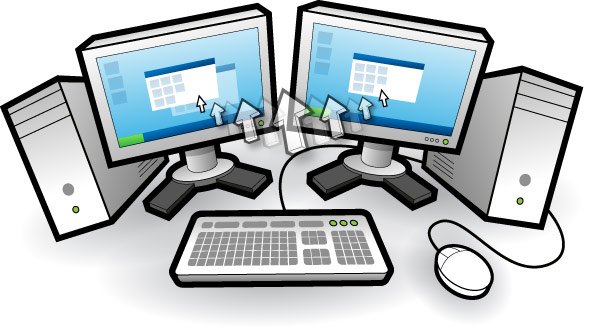
Want to Control Multiple PC with Same Mouse and Keypad than you have to try Input Director,  it a free app which allows you to control multiple Windows systems using the keyboard/mouse attached to one computer. With Input Director, you can share a single keyboard/mouse across a set of systems. You switch which system receives the input either by hotkey or by moving the cursor so that it transitions from one screen to the other (in a very similar fashion to a multi-monitor setup).
Using Input Director, you will be able to position the monitors of your systems side-by-side and then control all of them via one keyboard/mouse. Input Director also supports a “shared” clipboard, in which you can copy data onto the clipboard on one system, transition across to another and paste.
Features of “Input Director”:
Easy to Use:
· Easy to follow installation and usage guides – setup only takes a few minutes
Tell Input Director how your monitors are positioned simply by dragging them to the correct spot on the monitor grid:
· Multi-monitor support
· Shared Clipboard – copy and paste between computers (including files!)
Manage all your computers at once:
· Simultaneously lock all computers
· Synchronise the screensavers across your computers
· Synchronise shutdown of your system (or individually configure whether a computer goes to standby, hibernate or shuts down)
Security:
· Encrypt network data between Input Director controlled computers using AES with a 128, 192 or 256bit key
· Lock down the Input Director configuration so that only Administrators may make changes
· Systems can limit which master systems can control them by host name or network subnet
Transition Features:
Ripples surround the cursor for a few seconds after transitioning to help the eye follow the cursor from one computer to another:
Transitioning using the mouse can be setup to occur:
· Immediately when the cursor hits the edge of the screen
· If the screen edge is double tapped by the cursor
· If the cursor momentarily pauses at the edge of the screen
· Can be configured to limit transitions near the corners of computer monitors to avoid accidental slippage between systems
· Can also set a key (or keys) that must be held down to permit transitions between systems
· Hotkeys can be setup to switch control to a specific computer or move to the next computer to the left or right

Production Release

The latest Production version of Input Director is v1.2.2 and was released on the 1st February 2010.

Beta Version

Beta version v1.3 build 97 was released on the 22nd September 2011

Friday, November 4, 2011

Get Windows 8 Start Menu On Windows 7 With Newgen


In the past we mentioned about how you can transform your Windows 7 to Windows 8. Today we will guide how you can get the Windows 8 Start Menu look on your Windows 7 or Vista PC. To get the windows 8Start menu look you have to try the new app Newgen.
Newgen is an application that brings the new Metro UI to your windows 7, Vista desktop. With the help of Newgen you can enjoy Windows 8 Metro UI on your windows 7 PC. Metro UI displays live widgets as tiles on desktop and you can also pin applications, websites to your desktop directly. Newgen is a set of live widgets that shows some content from the web and some from your PC. It supports WPF, HTML5, and HTML widgets.
The app also comes with a store from where you can add more widgets to the start screen easily. From the Setting option you can also change the look of the start screen.
Feature of Newgen app
Support for HTML widgets
Launch your favourite apps and webs in one click
Customize as you want
Switch to your opened apps, in just few clicks
Get Windows 8 Metro UI to your desk
Play your videos and music, view your pictures without opening them
Get your tweets, mails and weather reports in front of your eye, just sitting
Provides easy-to-use API for Widget developers
Get updates from us without navigating our site

BY : Sanjz Vekaria

FREE CCleaner v3.05 Download – Supports IE 9 and Firefox 4


CCleaner v3.05 : small, fast, comprehensive and best freeware for tuning and optimizing your windows.
▶ Has been updated for the latest version of browsers – IE 9 & Firefox 4.
CCleaner v3.05 : is a magnificent freeware for tuning and optimizing your windows.
What makes it unique ?
Speed – Yes you heard that right. It is the speed at which it carries out the various scans and fixes that makes CCleaner unique from others tools in this segment.
What it does ?
  • It removes unused files from windows making it to run faster.
  • Free-up some valuable space on your hard disk.
  • It cleans traces of your online activities.
  • It has a fully featured registry cleaner to fix the registry problems.
  • Great for uninstalling programs and startup items.
  • Contains NO Spyware or Adware.
What’s new with this version ?
In an effort to support the latest version of browsers IE 9 and Firefox 4,  improvements have been made to the version 3.05 of CCleaner.
It cleans browsers like Internet Explorer, Firefox, Google Chrome, Opera & Safari.
  • Added support for Windows 7 SP1.
  • Added Internet Explorer UserData cleaning and management.
  • Added Safari cookie management.
  • Improved Google Chrome detection.
  • Added Google Chrome JumplistIcons folder cleaning.
  • Added Opera Icon Cache folder cleaning.
  • Added support for Comodo Dragon.
  • Added support for SongBird embedded browser.
  • Added support for Thunderbird embedded browser.
Download :
or
OS Support :
This freeware is completely supported by Windows XP, Vista and 7.
Last Words :
CCleaner helps you in keeping your PC clean. It’s small, fast, comprehensive, and best – get cleaning now!

Quick Heal Total Security 2012 Free Download (Full Version)


▶ Quick Heal Total Security 2012 Free Download (Full Version) .
▶ It is an all-in-one security suite that shields your desktops and laptops against various kinds of threats like viruses, worms, trojans, rootkits, spywares and other malicious softwares.
▶ Downloads :

Quick Heal Technologies is one of the world’s foremost provider of Internet security tools and is a leader in anti-virus technology.
Started in 1993, it has spent around 18 years in the innovation of new security products to make Internet a safest place.
Quick Heal Total Security 2012
It is an all-in-one security suite that shields your desktops and laptops against various kinds of threats like viruses, worms, trojans, rootkits, spywares and other malicious softwares.
It not only includes the standard modules like antivirus, antiphishing, antispam but you also get many other features bundled along with it. This makes using Quick Heal Total Security 2012 a pleasure.
It offers different layers of smart protection that pro-actively detect and eliminate threats even before they reach your computer.
What makes it unique?
It uses the state-of-art DNAScan Technology, unique to Quick Heal products that offers the best protection without compromising with the performance of your system.
Its advanced PC2Mobile Scan feature Scans and cleans mobile phones, smartphones and PDA’s  via PC using either USB cable or Bluetooth .
The PCTuner present in QTS 2012 tunes the start-up applications and cleans unwanted registry files to speed up your PC’s performance.
Quick Heal Total Security 2012 features a modern and intuitive interface that is easy-to-use by all kinds of users i.e beginners and experts.
Key Features
  • Gives the latest and surest virus protection as certified by Check Mark and VB100%.
  • Provides Cloud based web protection.
  • Blocks spam mails, phishing attack mails before they reach your inbox.
  • Assures complete protection from all the viruses “In-The-Wild”.
  • Detects and removes potentially unwanted applications (PUAs).
  • The Entertainment Mode allows the user to play games, watch movies or presentations uninterruptedly.
  • Blocks USB devices from accessing confidential data.
  • Low footprint ensures up-to-date protection without being heavy on your system.
  • Allows full user control for easy configuration.
  • Helps create an emergency bootable disk for Windows PC .
Screeshots


Official Website

Twitter Delicious Facebook Digg Stumbleupon Favorites More

 
Design by Free WordPress Themes | Bloggerized by Lasantha - Premium Blogger Themes | Bluehost