Showing posts with label Windows. Show all posts

Tuesday, May 1, 2012

Download AMD Catalyst Drivers 12.4 For XP, Vista & Win 7


AMD's award-winning Catalyst graphics and HD video configuration software delivers unprecedented control of performance and visual quality with AMD Radeon graphics processors. AMD Catalyst drivers deliver stable performance and push the limits of innovation with advanced user-oriented features.
Precision controls for power users. Tweaks for gamers and video enthusiasts. Simple wizard-assisted setup, easy multi-monitor configuration, and ultra reliable operation for working professionals. New user or seasoned expert, AMD Catalyst puts you in charge of The Ultimate Visual Experience.


Industry-leading performance
  • AMD Catalyst updates are focused on improving graphics performance, including enhancements for popular Direct3D and OpenGL game titles.
Innovative and exciting features
  • AMD Catalyst includes the AMD Catalyst Control Center, delivering innovative features and unprecedented control of performance and visual quality with AMD Radeon graphics.
Robust stability
  • Catalyst drivers for Windows Vista and Windows XP are Microsoft WHQL-certified to deliver the industry's most stable and reliable graphics performance.

Downloads :


BY : Sanjz Vekaria

Download New NVIDIA Forceware 296.10 WHQL Drivers For XP, Vista & Win 7


NVIDIA ForceWare software unleashes the full power and features in NVIDIA's desktop, gaming, platform, workstation, laptop, multimedia, and mobile products. Delivering a proven record of compatibility, reliability, and stability with the widest range of games and applications, ForceWare software ensures the best experience with your NVIDIA hardware.
  • Incredible 3D and video performance for all of your applications.
  • Rock-solid system stability, greater compatibility, and reliability with NVIDIA Unified Driver Architecture (UDA).
  • Industry-leading features for graphics, audio, video, communications, storage, and security.
  • Robust product support for over ten unique operating systems.
  • Continual product performance and feature updates for the life of your NVIDIA hardware. 

Downloads :


BY : Sanjz Vekaria

Monday, April 30, 2012

Download New AIMP 3.00.985 Media Player


AIMP is a free audio player with support for large number of formats and playlists. It works with multiple playlists immediately, allows creation of bookmarks and also has a playback queue.
  • Crystal-clear sound, technology of reproduction essentially differs from Winamp and WMP
  • Sensitive equalizer
  • A maximum of functionality from a minimum of resources
  • The minimal consumption of system resources
  • Multilingual support
  • Support of set of formats of audio
  • Adjustment of global and local hot keys (patterns from WinAmp and WMP)
  • Flexible options of the program and various covers will allow you to make A.I.M.P. completely individual
  • Support of plug-ins with which help it is possible to expand opportunities of the program
  • The audioconverter codes music from the most different formats in wma, mp3, wav, ogg
  • Plus many more !

Download :


BY : Sanjz Vekaria

Download iTunes 10.6.1 (32-bit) & (64-bit)


iTunes is a free application for Mac and PC. It plays all your digital music and video. It syncs content to your iPod, iPhone, and Apple TV. And it's an entertainment superstore that stays open 24/7.
  • Organize your music into playlists
  • Edit file information
  • Record compact discs
  • Copy files to an iPod or other digital audio player
  • Purchase music and videos on the Internet through the built-in iTunes store
  • Run a visualizer to display graphical effects in time to the music
  • Encode music into a number of different audio formats.

Downloads :


Download iTunes 10.6.1 ( X-32-bit )

BY : Sanjz Vekaria

Download Flash Player 11.3.300.231 Beta 2 (Non-IE)


Adobe Flash Player is the high performance, lightweight, highly expressive client runtime that delivers powerful and consistent user experiences across major operating systems, browsers, mobile phones and devices.
Installed on over 750 million Internet-connected desktops and mobile devices, Flash Player enables organizations and individuals to build and deliver great digital experiences to their end users.
  • Immersive experiences with Flash video, content and applications with full-screen mode.
  • Low-bandwidth, high-quality video with advanced compression technology.
  • High-fidelity text using the advanced text rendering engine.
  • Real-time dynamic effects with filters for Blur, DropShadow, Glow, Bevel, Gradient Glow, Gradient Bevel, Displacement Map, Convolution, and Color Matrix.
  • Innovative media compositions with 8-bit video alpha channels.
  • Blend modes, radial gradient, and stroke enhancements.
  • Additional image formats: GIF, Progressive JPEG, and PNG.
This download is the standalone installer for Firefox, Opera and other Gecko-based browsers.
Old versions of the Flash player can be downloaded from Adobe at
http://www.adobe.com/go/tn_14266


Downloads :


Download Flash Player 11.3.300.231 Beta 2 (Non-IE) ( X-32-bit )
BY : Sanjz Vekaria

Sunday, April 29, 2012

Download New Firefox 13.0 Beta 1


The Web is all about innovation, and Firefox sets the pace with dozens of new features to deliver a faster, more secure and customizable Web browsing experience for all.
User Experience. The enhancements to Firefox provide the best possible browsing experience on the Web. The new Firefox smart location bar, affectionately known as the "Awesome Bar," learns as people use it, adapting to user preferences and offering better fitting matches over time.
Performance. Firefox is built on top of the powerful new Gecko platform, resulting in a safer, easier to use and more personal product.
Security. Firefox raises the bar for security. The new malware and phishing protection helps protect from viruses, worms, trojans and spyware to keep people safe on the Web.
Customization. Everyone uses the Web differently, and Firefox lets users customize their browser with more than 5,000 add-ons.

 
Download :


BY : Sanjz Vekaria


Download New Adobe Reader 10.1.3


Adobe Reader software is the global standard for electronic document sharing. It is the only PDF file viewer that can open and interact with all PDF documents. Use Adobe Reader to view, search, digitally sign, verify, print, and collaborate on Adobe PDF files.

  • View, print, and search PDF files, including PDF Portfolios and PDF maps
  • Author, store, and share documents, and share your screen, using Acrobat.com services
  • Experience richer content and greater interactivity with native support for Adobe Flash technology
  • Review documents using familiar commenting tools such as sticky notes, highlighting, lines, shapes, and stamps (When enabled by Acrobat Pro or Acrobat Pro Extended)
  • Digitally sign PDF documents (When enabled by Acrobat Pro or Acrobat Pro Extended)

Download :


BY : Sanjz Vekaria


Download New Google Chrome 19.0.1084.36 Beta


Google Chrome is a browser that combines a minimal design with sophisticated technology to make the web faster, safer, and easier.
One box for everything
Type in the address bar and get suggestions for both search and web pages.
Thumbnails of your top sites
Access your favorite pages instantly with lightning speed from any new tab.
Incognito mode
Don't want pages you visit to show up in your web history? Choose incognito mode for private browsing.
Safe browsing
Google Chrome warns you if you're about to visit a suspected phishing, malware or otherwise unsafe website.
For information about alpha and developer builds, check out the Chrome dev channel here.


Download :


BY : Sanjz Vekaria


Download New Java Runtime Environment 1.7.0.4 ( 32-bit &64-bit ))


Java software allows you to run applications called "applets" that are written in the Java programming language. These applets allow you to have a much richer experience online than simply interacting with static HTML pages.
Java Plug-in technology, included as part of the Java 2 Runtime Environment, Standard Edition (JRE), establishes a connection between popular browsers and the Java platform. Java allows applications to be downloaded over a network and run within a guarded sandbox. Security restrictions are easily imposed on the sandbox.
Many cross platform applications also require Java to operate properly


Downloads :


 BY : Sanjz Vekaria

Download New VLC Media Player 2.0.1


VLC media player is a highly portable multimedia player for various audio and video formats as well as DVDs, VCDs, and various streaming protocols without external codec or program.
It can also be used as a server to stream in unicast or multicast in IPv4 or IPv6 on a high-bandwidth network.
VLC can play:


  •  MPEG-1, MPEG-2 and MPEG-4 / DivX files from a hard disk, a CD-ROM drive, and so on
  • DVDs, VCDs, and Audio CDs
  • From satellite cards (DVB-S)
  • Several types of network streams: UDP/RTP Unicast, UDP/RTP Multicast, HTTP, RTSP, MMS, etc.
  • From acquisition or encoding cards (on GNU/Linux and Windows only) 


 Download :


 BY : Sanjz Vekaria

Download Latest Version Of Skype 5.9.0.114


Skype is software for calling other people on their computers or phones. Download Skype and start calling for free all over the world.
The calls have excellent sound quality and are highly secure with end-to-end encryption. You don't even need to configure your firewall or router or any other networking gear.


Additionally it doesn't just work on Windows. Skype is also for Mac OS X, Linux and PDAs using Pocket PC, with a native look and feel for each platform. Talking, sending instant messages or even file transfers work between different platforms like a charm.
  • Skype calling - Skype has all the features of an ordinary phone so it's even easier to manage your calls.
  • Video calling - see who you are talking to at the same time as speaking to them.
  • Add Skype and SkypeOut contacts - Add contacts who use Skype and those who use ordinary phones so you can call more people.
  • Organising groups - group contacts under certain names and share them with your contacts so they can talk to them too.
  • Basic chat and emoticons - when it's not convenient to call, chat or Instant Message (IM) your contacts.
  • Group chat - for when it's easier to chat or Instant Message (IM) all your friends at once.
  • Profile settings - change how you appear to the world and let people know a bit about you.
  • Conference calling - talk to more than one friend at a time.
  • Import contacts - search your address book to find friends and family that already have a Skype name and start calling them for free.
  • View Outlook contacts - view and call your Microsoft Outlook® contacts quickly and directly from your Skype contact list.
  • Quickfilter and Speed-Dial - find Skype contacts, recent chats and SkypeOut contacts quickly and easily, then enter their Skype name to call them back quickly.

Download :


BY : Sanjz Vekaria


Sunday, January 22, 2012

Download Adobe Air 3.2.0.1720 Beta 4


The Adobe® AIR, runtime enables you to have your favorite web applications with you all the time. Since applications built for Adobe AIR run on your desktop computer without a web browser, they provide all the convenience of a desktop application.
Companies like eBay and AOL are using Adobe AIR to create exciting new applications that allow you to use their services on your desktop.
In short, Adobe AIR means applications that are easier, more powerful, and more fun to use.
Be safe on the web: Adobe AIR helps ensure safe installations by requiring digital signatures on each AIR application that identify the application and its creator before you install.


Download :


BY : Sanjz Vekaria

Download DAEMON Tools Lite 4.45.2


With DAEMON Tools you can back up your physical CD/DVD/HD DVD/Blu-ray discs into "virtual discs" or so called "disc image" files, which run directly on your hard drive. You can also work with images created by other burning programs! DAEMON Tools supports variety of image types. Use CD/DVD image converter to have one format images in your Image Catalog!
1. Emulate virtual CD/DVD-ROM/HD DVD and Blu-ray drives
DAEMON Tools Lite [Commercial] enables you to emulate up to 4 CD/DVD virtual drives on your PC. Virtual drives will appear in your OS just like real ones. Select a virtual drive then choose a disc image you want to mount. Find the created virtual drive with mounted disc image in My Computer. Start working! Looks like working with a real drive and a real disc, doesn't it? Yes, but it is much faster!
2. Create a disc image
With DAEMON Tools Lite [Commercial] you can create ISO and MDS image files from original discs inserted in physical CD/DVD/HD DVD/Blu-ray drives. Or use images you have created earlier with other program. DAEMON Tools products work with variety of image types.
Key features
  • creates *.iso and *.mds images;
  • emulates up to 4 virtual CD/DVD drives;
  • performs image mounting and unmounting;
  • supports *.b5t, *.b6t, *.bwt, *.ccd, *.cdi, *.cue, *.nrg, *.pdi, *.isz;
  • offers powerful command line interface.


Download :


BY : Sanjz Vekaria

Friday, January 20, 2012

Download TeamViewer 7.0.12142


TeamViewer is a popular, easy to use desktop sharing tool.

As soon as your friends and relatives find out that you know a bit about computers, it's all over. They'll be asking you for help with the most varied tech issues on a constant basis, as if you were a permanent, free customer support service.

Luckily you can count on TeamViewer 6 to lend you a hand. TeamViewer lets you gain access to the desktops of your friends, relatives or even customers in a snap. What's more, it doesn't require any technical skills on the remote side, making it incredibly easy to use.

A bit like Online Desktop Presenter, all you have to do is run TeamViewer and ask the other person to run it as well. Each time you run TeamViewer you'll be given a unique session number and password which you can use to enter the other person's PC. This means TeamViewer can be used for both entering a remote computer and letting another person enter yours in case you need remote assistance as well.

Beside viewing the remote desktop just as if you were sitting in front of it, you can also make use of the program's features: embedded chat client, file transfer tool, the possibility of recording the session, and more.

This version of TeamViewer is a stripped-down version of the paid application and therefore lacks some extra modules and functionality. Nevertheless it's still a great helper when you need to fix small problems in remote systems or show someone else how to do a certain task on the computer.

TeamViewer is an excellent desktop sharing tool that lets you manage remote systems in a safe way and without requiring a lot of technical knowledge.


Download :


BY : Sanjz Vekaria


Tuesday, November 8, 2011

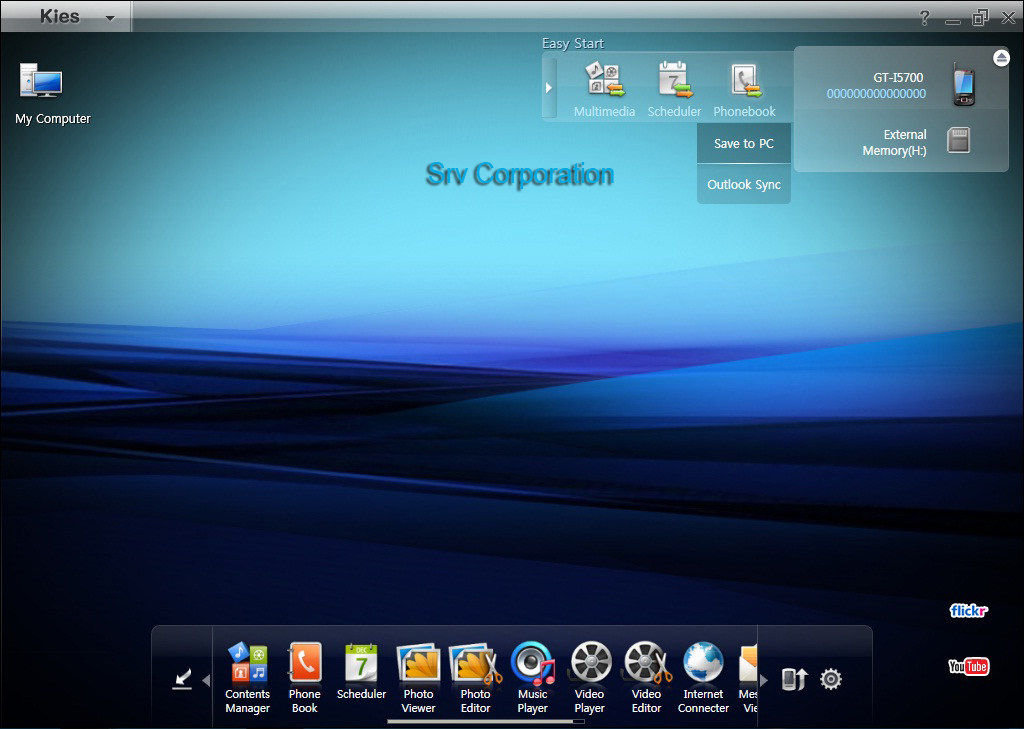
Download Samsung Kies PC Suite v2.0.3.11082_152_4


Samsung Kies is a free PC suite software which is used to connect between the latest Samsung smartphones with your personal computer. Samsung Kies offers a lot of widgets providing various functions between the phone and PC. Samsung Kies latest version is v2.0.3.11082_152_4 for Windows and v1.0.1.11095_18_2 for Mac, and was officially released on August 1, 2011. This new version can be downloaded from the Samsung Global Download Center or your individual Samsung’s phone support pages.
Every you connect your smartphone to Samsung Kies PC Suite via your computer, you will automatically be notified of new firmware updates when it is available to download. However, you need to be connected to the internet before you can proceed it.
By using Samsung Kies you can easily sync your phone contacts and calendars with MS Outlook, Gmail, Yahoo mail, you also can add and edit contact directly from Kies interface.

Screenshots :


The Main Features of Samsung Kies PC Suite

  • Data Transfer (between PC & device).
  • Sync your phone contacts and calenders with MS Outlook, Gmail, Yahoo Mail, add and edit contacts directly from Kies interface.
  • Multimedia Management, Backup/download media (image, audio and video files) from phone to PC.
  • Purchase Features from online store with easy payment.
  • Device Firmware Upgrade.
  • Convert videos on your computer for your Samsung smartphone.
  • Make your own favorite music play-list and sync it with your mobile phone
  • Tether the smartphone as a modem
  • Multilingual supported.
Samsung Kies latest version support several samsung mobile phone devices, such as :
  • Samsung Wave
  • Samsung Jet Ultra Edition
  • Samsung Galaxy Portal
  • Samsung Omnia Lite
  • Samsung Omnia Pro
  • Samsung Omnia II
  • Samsung Galaxy 3
  • Samsung Galaxy S
  • Samsung Galaxy S Plus
  • Samsung Galaxy S II
  • Samsung Galaxy Tab
  • Samsung Galaxy Ace
  • Samsung Galaxy Gio
  • Samsung Champ Camera 3303
  • Samsung i8910HD
  • Samsung C6625
  • Samsung Infuse 4G
  • Samsung GALAXY 3 GT-i5801
  • Samsung Galaxy Europa GT-i5500
  • Samsung Corby Pro GT-B5310
  • Samsung Duo GT-B7722
  • Samsung Galaxy Mini GT-S5570
  • Sidekick 4G
Samsung Kies PC Suite is available for your Windows PC, and Mac OS.
System Requirements:
  • OS: Microsoft Windows 7, Vista, XP
  • Hardware: Intel Pentium 1.8 GHz processor or higher. 1.00 GB of RAM or higher. At least 500 MB free disk space.
  • Others: .Net Framework 3.5 SP1 or Later Windows Media Player 10 or later. ActiveSync (Windows XP), Device Center (Windows Vista). DirectX 9.0C or above

Monday, November 7, 2011

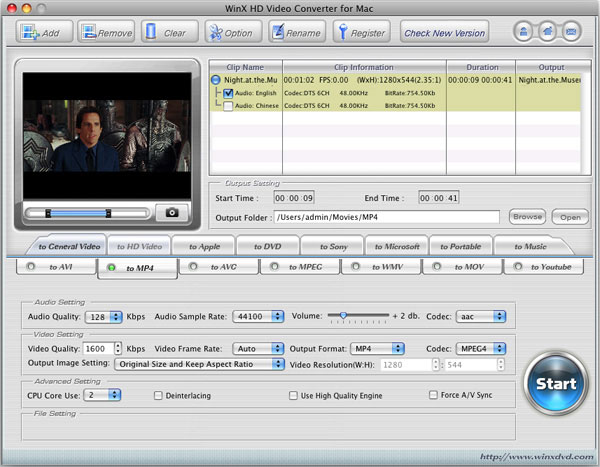
Download WinX HD Video Converter With License key for Mac & Windows


The WinX DVD Halloween giveaway. Everyone can obtain the WinX HD Video Converter License key for Mac and Windows for free.  The both version of HD video converter software is given the separates website. WinX HD Video Converter for MAC given in the Digiarty Facebook whereas the WinX HD Video Converter for windows given in the special offer page of Digiarty software.
The both version of HD Video Converter for Mac and windows having same features. Normal price of WinX HD video converter license key is $35.95 for one user license but now in Halloween giveaway it free. Besides as video converter, the WinX HD Video Converter also can be used as Youtube downloader and DVD burner (to vreate DVD movie from your video collection), it’s on of the best features from this video converter software. WinX HD Video converter support almost all videos format and the output file can be played on PC, or portable device such as iPhone, PDP, Ipad and other.
WinX HD Video Converter for Mac

How do Obtain the WinX HD Video Converter License key
Its easy, because no registration requires to obtain WinX HD Video Converter License key license key. If you are windows user, you can obtain the software in the WinX special offer, whereas if you are Mac user, you can download  the WinX HD Video converter for Mac in Digiarty Facebook.


Downloads :

For Windows


License Key : AF-TUTNTOZV-HQMMKP


For Mac


License Key : The license key are included in the downloaded files.


BY : Sanjz Vekaria

Download Windows 7 SP1 RTM


windows-7-sp1
The long awaited RTM version of Windows 7 Service Pack 1 has been released to general public by Microsoft and is available for download now. This comes days after it was made available to the tech community at MSDN and TechNet. Even the Windows Server 2008 R2 SP1 RTM has been released.
The RTM of Windows 7 SP1 [KB976932] is available for Free, but validation is required in order to download it. Windows 7 Service Pack 1 (SP1) doesn’t include any major new features but it is a relatively important update that includes previously released security, performance, and stability updates for Windows 7. It also includes new improvements to features and services in Windows 7, such as improved reliability when connecting to HDMI audio devices, printing using the XPS Viewer, and restoring previous folders in Windows Explorer after restarting.

Downloads :

Below are the download links to Windows 7 SP1 RTM.

Download Windows 7 SP1 RTM EXE (32-bit)                 (537.809 MB)

Download Windows 7 SP1 RTM EXE (64-bit)                 (903.196 MB)

Download Windows 7 SP1 RTM EXE (32-bit & 64-bit)   (1953.3 MB)


BY : Sanjz Vekaria

Saturday, November 5, 2011

Download Windows 8 Developer Preview English, 32-bit (x86)


Windows 8 Developer Preview downloads

The Windows 8 Developer Preview is a pre-beta version of Windows 8 for developers. These downloads include prerelease software that may change without notice. The software is provided as is, and you bear the risk of using it. It may not be stable, operate correctly or work the way the final version of the software will. It should not be used in a production environment. The features and functionality in the prerelease software may not appear in the final version. Some product features and functionality may require advanced or additional hardware, or installation of other software.
Note: You can't uninstall the Windows 8 Developer Preview. To go back to your previous operating system, you must reinstall it from restore or installation media.


Windows 8 Developer Preview English, 32-bit (x86)


Includes a disk image file (.iso) to install the Windows 8 Developer Preview and Metro style apps on a 32-bit PC.
Note: This download does not include developer tools. You must download the Windows 8 Developer Preview with developer tools 64-bit (x64) to build Metro style apps.

Screenshots :


System Requirements

The Windows 8 Developer Preview works great on the same hardware that powers Windows Vista and Windows 7:
  • 1 gigahertz (GHz) or faster 32-bit (x86) or 64-bit (x64) processor
  • 1 gigabyte (GB) RAM (32-bit) or 2 GB RAM (64-bit)
  • 16 GB available hard disk space (32-bit) or 20 GB (64-bit)
  • DirectX 9 graphics device with WDDM 1.0 or higher driver
  • Taking advantage of touch input requires a screen that supports multi-touch
  • To run Metro style Apps, you need a screen resolution of 1024 X 768 or greater

Download :

Download Windows 8 (2.8 GB )

Notes about installing the Windows 8 Developer Preview
A clean install is supported on all builds, but you can upgrade if you are installing a download without the developer tools. You will receive the full set of migration options when setup is launched in Windows. To dual-boot, you must first boot from media and choose an alternative partition.
Install on:Windows 8 Developer Preview with developer toolsWindows 8 Developer Preview without developer tools (32-bit or 64-bit)
Windows 7 and Windows VistaClean install onlyYou can keep accounts, files, and settings
Windows XPClean install onlyYou can only keep accounts and files

How to install the Windows 8 Developer Preview from an ISO image

The Windows 8 Developer Preview is delivered as an .iso image that must be converted into installation media stored on a DVD or a USB flash drive. On Windows 7, the easiest way to convert this file is to use Windows Disc Image Burner. On Windows XP and Windows Vista, a third-party program is required to convert an .iso file into installable media—and DVD burning software often includes this capability.
Note: The .iso file that contains the developer tools requires a large capacity DVD called a DVD-9, as well as a DVD burner that can handle dual-layer (DL) DVDs. Most modern burners should be able to handle this format.


BY : Sanjz Vekaria

Twitter Delicious Facebook Digg Stumbleupon Favorites More

 
Design by Free WordPress Themes | Bloggerized by Lasantha - Premium Blogger Themes | Bluehost